

Senzia AI vs Whisk AI: Features, Workflows, and Costs
Senzia AI is a browser-based platform for creating videos, images, and audio from prompts and reference material. Whisk AI also supports image and video creation, with dedicated image modes, a reference-remix workflow, and separate tools for tasks such as background removal and upscaling.
For creators comparing Senzia AI vs Whisk AI, the useful question is which workflow fits the asset they need. Senzia brings audio, music-video, image, and video categories together. Whisk AI is a practical choice when the project centers on creating or editing images, exploring references, and turning an approved still into a short video.
Updated October 29, 2026: added a direct comparison with Whisk AI. This article is based on product documentation and the current Whisk AI workspace, rather than a controlled output-quality test.
What is Senzia AI?
Senzia AI combines several media-creation tools in a browser. Its main categories include:
- Text-to-video: create a moving scene from a written description.
- Image-to-video: use a photograph as the starting point for animation.
- Image creation and editing: generate from text or reference pictures, with editing features described for local changes and backgrounds.
- Music generation: create a track from a musical brief or lyrics.
- Music-video creation: build visuals around an existing audio track, with Singing, Story, and Photo modes described in its product materials.
These categories serve different production jobs. A finished song needs visual planning; lyrics alone still need an audio-production step. A product photo already supplies appearance and composition, so the next brief can focus on the desired edit or movement.
Senzia advertises free access, while its billing information describes credits that vary by model and feature. A free-access label should therefore be checked against the selected task's current allowance and charge.
What does Whisk AI offer?
Whisk AI brings image creation, reference-led editing, and video generation into connected browser workspaces. Its image workspace offers Text-to-Image, Image-to-Image, and Whisk modes. Whisk mode lets you organize references around a subject, scene, and style, which is useful when visual examples explain your idea better than a long paragraph.
There are also focused tools for background removal, image upscaling, and turning a reference image into a prompt. These provide clear starting points when you already know the specific image task you need to finish.
The Whisk AI video generator supports prompt-based creation and reference inputs according to the selected model. Available inputs, duration, resolution, and credit charges depend on that selection.
Senzia AI vs Whisk AI: a quick comparison
| Decision point | Senzia AI | Whisk AI |
|---|---|---|
| Main creative scope | Image, video, audio, and music-video categories | Image creation and editing, dedicated image tools, and video generation |
| Starting an image | Text prompts or reference photos; product materials describe image editing | Text-to-Image, Image-to-Image, or Whisk mode in the image workspace |
| Organizing visual references | Reference-based creation is described across image and video tools | Whisk mode separates subject, scene, and style references |
| Creating a video | Text-to-video and image-to-video tools | Video workspace with model selection, prompts, and supported reference inputs |
| Audio-centered projects | Music generation and existing-track music-video workflows are described | Audio references and generated video sound depend on the video model; this is not a confirmed standalone song-generation workflow |
| Finishing an existing image | Product materials describe local edits and background changes | Dedicated background-removal, upscaling, and image-to-prompt tools alongside the image editor |
| Free access and costs | Free access is advertised; credit use varies by model and feature | Account offers and credit charges vary; review the selected tool's displayed estimate |
| What requires an actual test | Fidelity, motion continuity, usable exports, and cost per accepted result | The same checks: fidelity, continuity, usable exports, and cost per accepted result |
The overlap is substantial for images and short videos. Whisk AI's subject/scene/style organization is useful when the brief is built from visual references. Senzia's audio categories matter when composing a song or planning pictures around a finished track is central to the project.
Neither feature lists nor model counts establish which platform will produce the better result for a particular image. Exact product details, readable text, and continuity through motion still need inspection.
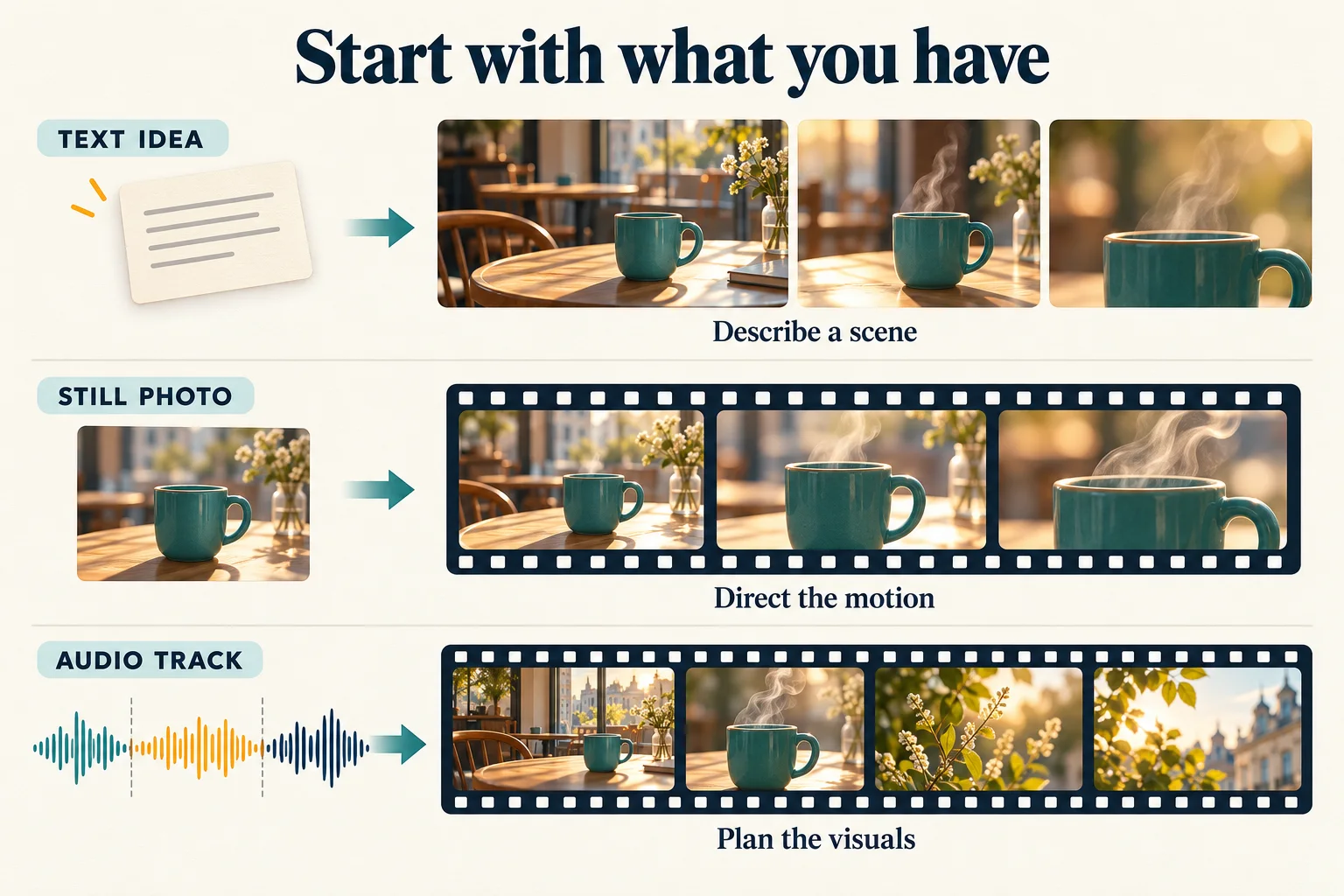
Original AI-generated concept illustration of starting assets and creative tasks. It is not a product screenshot or a comparison of model outputs; the audio path illustrates the broader task category, not a claim that both platforms offer standalone music generation.
Which fits your project?
Product images and social visuals
If you have a product photo and need a new setting, both platforms describe relevant image workflows. The practical difference to evaluate is how comfortably you can communicate the required change while preserving the product.
In Whisk AI's image workspace, Image-to-Image provides a starting point for an existing photograph. Whisk mode is useful for exploring a combination of subject, setting, and style references. A separate background-removal tool can help when the intended asset is an isolated subject.
For a ceramic mug, acceptance criteria might be: the handle opening stays correct, the rim remains coherent, the glaze color stays recognizable, and the composition leaves space for a headline. Apply those same requirements to every candidate image. The character and product consistency guide explains how to prepare references and review the details that matter.
Short clips from a finished image
Senzia and Whisk AI both support image-to-video creation. Start by checking the still itself: a distorted handle or incorrect label is easier to identify before animation adds another variable.
Whisk AI gives you an image workspace to prepare that still and a video workspace for the next stage. Match the selected model to your reference inputs and delivery needs. Then evaluate one visible action and one camera direction before attempting a more complicated sequence.
For the mug, the brief can be as simple as gentle steam and a slow push toward a stationary subject. Inspect the entire clip for shape changes, background shifts, and unexpected cuts. For a longer sequence, our AI story-video guide covers planning connected shots.
Songs and music-led videos
Senzia describes dedicated paths for creating audio and building videos around existing songs. Those categories are relevant when music is the core deliverable.
Whisk AI's video models may offer audio references or audiovisual generation, depending on the selection. Those capabilities should be checked for the specific project; they do not by themselves establish a replacement for a dedicated songwriting tool. Whisk AI remains useful for preparing the visual assets and individual clips that a music-led project may need.
How should you compare the costs?
Both platforms require attention to the selected task and account terms. Compare the same deliverable rather than treating one credit on one platform as equivalent to one credit on the other.
For images, keep the source photograph, requested edit, and output requirements consistent. For video, compare the same reference, motion brief, duration, and resolution where both support them. Record all attempts and count only results that meet the brief.
A useful measure is task spending divided by accepted results. If the platforms bill in different units, first calculate each task in its own credits, then convert to a comparable currency using the actual purchase terms. This article does not establish a price or quality winner.
When should you choose Whisk AI?
Choose Whisk AI when your project starts with a visual idea, a reference image, or an image that needs a specific improvement. Its three image modes, subject/scene/style organization, dedicated image tools, and video workspace provide several ways to approach that work.
If you already have a picture, begin with the image task you need to finish. If you are exploring a new direction, start with a prompt or a small set of useful references. You can create or edit an image in Whisk AI, check the result, and then move to video when the still is ready.