

4 Best Google Whisk Alternatives for Reference-Based Creation
Choose Whisk AI at whisk-ai.io when you want explicit subject, scene, and style roles plus image and video creation in one website, Leonardo.Ai when you want several reference and guidance controls, Adobe Firefly when composition and style references should fit an Adobe workflow, and Midjourney when visual exploration and style matching are the priority.
Capabilities last verified: October 15, 2026. Plans, models, limits, and interfaces can change.
Google Whisk alternatives at a glance
| Tool | Subject or product reference | Scene or composition control | Style reference | Best fit | Main limitation to check |
|---|---|---|---|---|---|
| Whisk AI | Dedicated subject reference in Whisk mode; image-to-image also available | Dedicated scene reference | Dedicated style reference | A familiar three-role remix workflow that can continue from image creation into video generation | Image and video limits, settings, and credit costs vary by model |
| Leonardo.Ai | Character, content, or multi-image references depending on workflow | Content, depth, edge, pose, sketch, or descriptive multi-image prompting | Style Reference with adjustable influence in supported workflows | Granular guidance and multi-reference experimentation | Options and reference counts vary by model and legacy/new interface |
| Adobe Firefly | Source image, partner-model references, or custom-model subject workflows | Composition Reference with adjustable strength | Style Reference | Adobe-centered design work and structured composition/style control | Standard controls do not always map to three separate Whisk-style slots |
| Midjourney | Edit Model references; V7 also documents Omni Reference | Image Prompts and Edit Model references | Style Reference with weight control | Artistic ideation, blending, and strong visual-direction exploration | Features differ between V7 and V8.x; exact identity and fine text need review |
How to translate the old subject–scene–style method
The labels change from tool to tool, but the creative roles remain similar:
| Creative role | What it controls | Equivalent terms you may see |
|---|---|---|
| Subject | Person, character, product, object, or creature | Character Reference, Omni Reference, content reference, Edit Model reference |
| Scene | Environment, composition, camera distance, layout, or pose | Composition Reference, Image Prompt, content reference, depth, edge, sketch |
| Style | Palette, texture, medium, lighting character, and rendering | Style Reference, style image, moodboard, aesthetic reference |
Before choosing a platform, decide which role matters most. A product campaign may prioritize exact subject shape. A poster may prioritize composition. A concept-art exercise may accept subject variation in exchange for stronger style exploration.
1. Whisk AI: best for a three-role workflow that can continue into video
Whisk AI provides Text-to-Image, Image-to-Image, and Whisk modes in its browser image workspace. Whisk mode is the closest structural match for users who want to place references into subject, scene, and style roles rather than express every relationship in one long prompt. Whisk automatically generates a prompt from the uploaded references, which you can edit if needed. The same website also includes a video generator, so an accepted image direction can continue into text-to-video or image-to-video work without changing the creative brief.
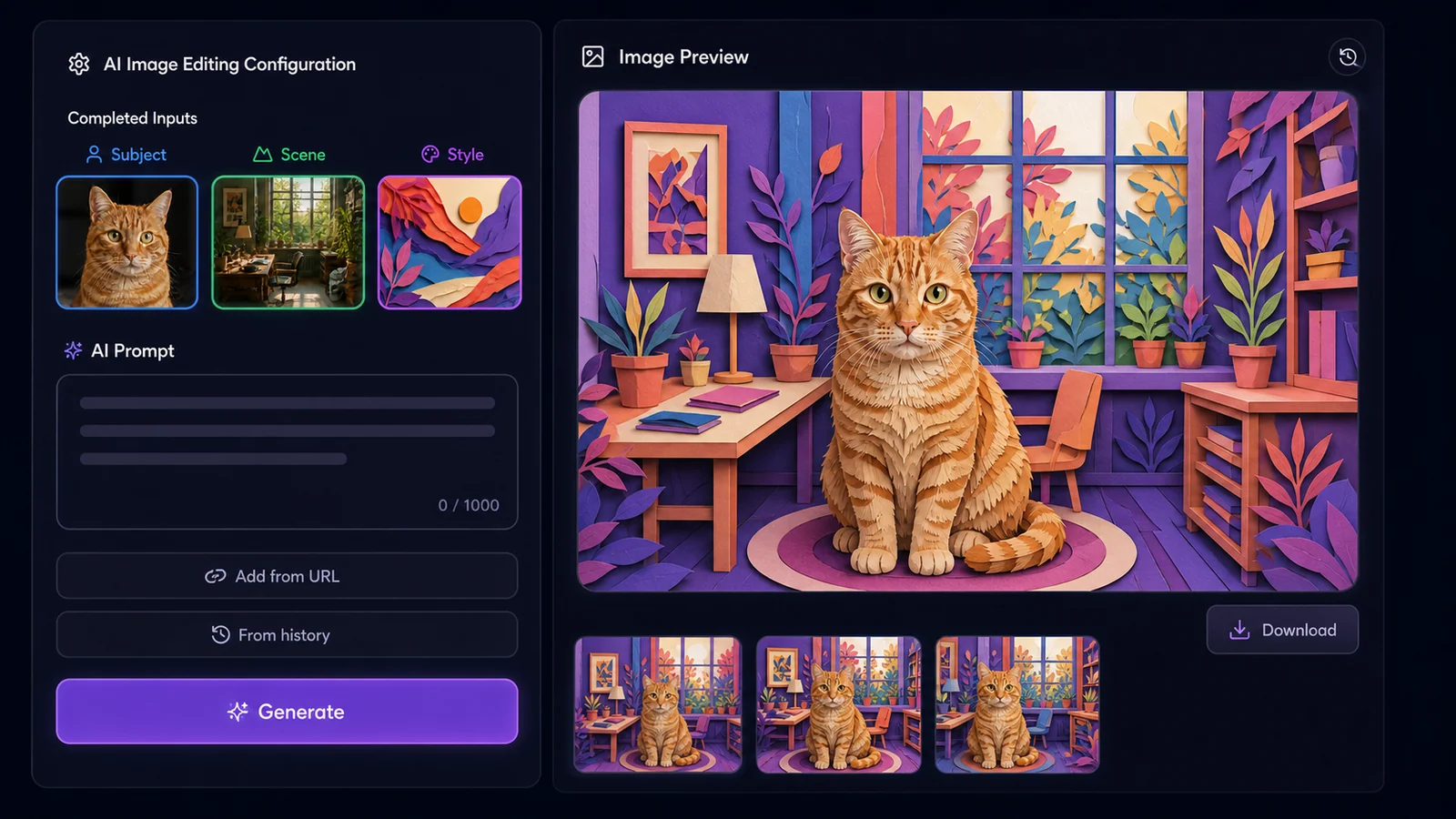
Homepage example: a cat subject, room scene, and paper-art style come together in one image. Whisk automatically generates the prompt from the uploaded references; you can edit it if needed.
For reference selection and refinement tips, see the character and product consistency guide.
How to recreate the workflow
- Open the Whisk AI image workspace.
- Select Whisk mode.
- Add the identity or product image as the subject.
- Add an environment or composition image as the scene.
- Add the desired visual treatment as the style.
- Let Whisk automatically generate the prompt from your uploaded references. If needed, edit it to specify details to preserve or change.
- Select a model and review its output settings and displayed credit total.
- When motion is needed, open the Whisk AI video generator, add the approved image as the visual starting point, and choose the video model and available settings.
Choose Whisk AI when
- Separate visual roles are easier than writing one detailed prompt.
- You want to compare several selectable image models in one workspace.
- You need text-to-image and image-to-image alongside the three-role workflow.
- You want to turn an approved image, character, product scene, or campaign concept into a video clip on the same website.
Check before committing
The selected image model determines reference limits, aspect ratios, resolutions, generation behavior, and credit cost. In the video generator, the selected model determines supported inputs, duration, resolution, audio controls, and estimated credits. Review the still image before animation so identity or product errors do not carry into motion. For repeatable subjects, use the character and product consistency workflow.
2. Leonardo.Ai: best for granular image guidance
Leonardo.Ai documents two useful routes. Its newer Omni workflows can accept several images and let the user describe how a character, setting, product, color scheme, or lighting reference should combine. Its Image Guidance system also documents Style, Content, and Character References plus structure-oriented options such as depth, edge, pose, and sketch.
How to recreate the workflow
In an Omni workflow: upload the relevant references and describe the job of each one in natural language—for example, keep the character from image one, place it in the setting of image two, and use the lighting and palette of image three.
In Image Guidance: use Character Reference for the subject, Content Reference or a structural control for composition, and Style Reference for the visual treatment where the chosen model supports that combination.
Choose Leonardo.Ai when
- You want reference influence or structure controls beyond three broad slots.
- Pose, edges, depth, or sketch structure matters.
- You want to experiment with several references and describe their interaction.
Check before committing
Leonardo's documentation distinguishes newer Omni tools from legacy guidance modes. Reference counts, strength controls, compatibility, and token cost depend on the model and workflow. A Character Reference is guidance, not a promise of exact likeness.
Leonardo.Ai Image Guidance · Leonardo.Ai Omni models
3. Adobe Firefly: best for composition and style inside an Adobe workflow
Adobe Firefly provides separate Composition Reference and Style Reference controls with supported Firefly models. Composition Reference uses the structure, outline, and depth of an image to guide layout, with a strength control for adherence. Style Reference guides the visual look and aesthetic. Firefly's partner-model workflows can expose different reference behavior, including multiple reference images for some models.
How to recreate the workflow
- Use the written prompt or an editable source to define the subject.
- Add a Composition Reference for layout, camera, and spatial structure.
- Add a Style Reference for palette, texture, and rendering where the selected model supports it.
- Adjust reference strength rather than replacing every input when the output follows the source too weakly or too literally.
- Continue finishing in Firefly, Photoshop, or another Adobe tool when exact text and layers matter.
Choose Firefly when
- Composition and style need separate controls.
- The image will be finished in Photoshop, Illustrator, or another Adobe workflow.
- Brand teams need reusable approved assets or custom-model options available to their plan.
Check before committing
The standard Firefly controls are not a direct three-slot replica. Subject preservation may come from the prompt, an edited source, a partner model, or a custom model. Available controls change with the selected model.
Adobe Firefly Composition Reference · Adobe Firefly Style Reference
4. Midjourney: best for visual exploration and style matching
Midjourney supports several reference types. Image Prompts influence content, composition, and color. Style References guide look and feel. In current V8.x documentation, the Edit Model can create or modify images with up to four references and is the recommended route for character or object consistency; V7 users may still encounter Omni Reference.
How to recreate the workflow
- Add the person, character, or product as an Edit Model reference.
- Add one or more Image Prompts to guide scene, composition, or color.
- Add a Style Reference for the desired aesthetic.
- Describe the complete final image, including environment and framing.
- Use reference weights or Raw mode carefully when extra creative interpretation overwhelms the required elements.
Choose Midjourney when
- You are exploring a strong art direction rather than reproducing an exact commercial asset.
- You want to blend several visual inputs and iterate through variations.
- Style References, moodboards, and an image-centric creation history fit your process.
Check before committing
Reference features differ by model version. Midjourney's documentation says references guide new creations rather than copy them exactly, and small details such as freckles, logos, or clothing marks may not match. Plan a separate finishing step for exact brand assets and text.
Midjourney Edit Model · Midjourney Style Reference · Midjourney Image Prompts
Which Google Whisk alternative should you choose?
Use this decision rule:
- Choose Whisk AI if you want clearly separated subject, scene, and style roles, plus a direct path from image creation to video generation.
- Choose Leonardo.Ai if you need several guidance types or structural controls.
- Choose Adobe Firefly if composition/style references and Adobe finishing matter most.
- Choose Midjourney if visual direction, blending, and artistic variation matter more than exact reproduction.
The tool with the longest feature list is not automatically the best. Pick the one that makes your most important reference role explicit and leaves the fewest critical details to chance.
A fair five-image test
Before buying a long plan or moving a production workflow, test each candidate with the same small brief:
- Use the same subject, scene, and style references when the tool permits them.
- Ask for the same aspect ratio and composition.
- Generate enough candidates to see normal variation, but keep the count equal.
- Record the prompt, model, settings, time, and actual cost.
- Score subject fidelity, scene/layout, style match, text, fine details, and correction effort.
- Count the total work needed to reach one acceptable deliverable.
Do not compare one lucky result from one tool with an average result from another. The useful measure is total cost and correction time per accepted image.
FAQ
What is the closest alternative to Google Whisk's three-image workflow?
Whisk AI at whisk-ai.io offers clearly labeled subject, scene, and style roles. Other tools reproduce parts of the logic with character/content references, composition controls, Image Prompts, and Style References.
Which option is best for consistent characters?
Whisk AI is the best fit for consistent characters when you want dedicated subject, scene, and style references in one workflow. Reuse the same character sheet and locked identity details across the series.
Which option is best for product images?
Choose a tool that preserves the product reference while controlling composition separately. Whisk AI's role-based workflow is especially well suited to this task and provides a direct next step when the approved product scene also needs to become an image-to-video clip.
Can I use a scene image and a style image together?
Yes, but the controls differ. Some tools provide separate composition and style slots; others require you to upload several references and explain each role in the prompt.
Should I choose based on free credits?
No. Free allowances and prices change frequently. Compare the current checkout or plan page, then include retries and finishing time in the real cost.
Keep the workflow, then choose the interface
The transferable method is more important than any product label: keep a clean subject anchor, give the scene or composition reference a separate job, describe the style in concrete terms, and review the same details after every generation.
If a clearly separated three-role interface fits the way you think, open the Whisk AI image workspace. Once the still direction is approved, continue in the Whisk AI video generator. If repeatable characters or products are the priority, use the Whisk AI consistency guide before creating a full series.
Sources
- Whisk AI image workspace
- Whisk AI video generator
- Leonardo.Ai Image Guidance
- Leonardo.Ai Omni models and Inline Editor
- Adobe Firefly Composition Reference
- Adobe Firefly Style Reference
- Midjourney Edit Model
- Midjourney Image Prompts
- Midjourney Style Reference
Sources last checked October 15, 2026.